Prompt engineering
Prompt engineering is one of the most practical techniques when working with LLMs. It allows you to guide model behavior, improve output quality, and build reliable applications without modifying the model itself.
What is prompt engineering?
A prompt is simply the input you send to an AI model. The model can reason and generate text, but it relies on the prompt to understand:
- What task it should perform
- What format the answer should follow
- What constraints it must respect
Prompt engineering is the practice of structuring instructions, examples, and context in a way that guides a model toward the result you want. For many inference workloads, better prompts are the simplest path to better results.
For example, these two prompts produce very different results:
# Basic prompt
Summarize this article.

# Improved prompt
Summarize the article in three bullet points.
Focus on key technical insights.
Do not include opinions or marketing language.
The second prompt gives the model clear expectations, which leads to more meaningful outputs.
Why prompt engineering matters for inference
Prompt engineering for LLMs is closely tied to how inference works.
During inference, the model does not change weights. It simply generates tokens based on the input it receives. This means the prompt becomes the main interface between your application and the model. Your prompt design directly impacts how the model behaves at runtime.
Token usage and cost
Every request includes input tokens (the prompt) and output tokens (the generated response). Longer prompts increase the number of tokens the model must process. This impacts:
- Latency: More tokens require more computation during the prefill stage
- GPU utilization: More tokens require more compute and memory bandwidth
- Inference cost: Token-based pricing or infrastructure cost scales with token usage
For high-throughput inference systems, prompt length becomes an important optimization factor.
KV cache usage
LLM inference relies heavily on the KV cache (Key-Value cache) to speed up generation.
During the prefill stage, the model processes the entire prompt and stores intermediate attention states in the KV cache. During decoding, the model reuses this cache instead of recomputing attention for previous tokens.
However, the size of the KV cache grows with the number of tokens in the prompt. This means longer prompts lead to:
- Larger KV cache memory usage
- Higher GPU VRAM consumption
- Fewer concurrent requests per GPU
For large models or long-context workloads, prompt size can directly affect throughput and system scalability.
Model reliability
In production inference systems, the model must behave consistently across thousands or millions of requests.
Poorly structured prompts can lead to:
- Inconsistent outputs
- Incorrect formats
- Unexpected reasoning paths
Carefully designed prompts reduce these risks. By clearly defining the task, output format, and constraints, you make the model behavior more predictable during inference.
This is particularly important when LLMs are used inside automated workflows, APIs, or agentic systems.
Runtime control layer
In many AI deployments, prompt engineering becomes the first layer of control over the model. Instead of modifying the model itself, developers adjust prompts to:
- Enforce output structure (JSON, markdown, etc.)
- Control tone or style
- Restrict behavior
- Guide reasoning
Because prompts are part of the request payload, they can be updated quickly without retraining models or changing the serving infrastructure. This makes prompts a flexible way to steer model behavior in production.
Prompt engineering is often tuned together with inference parameters. The prompt defines the task and constraints, while parameters such as temperature, top_p, and max_tokens control how the model samples and bounds the response.
Prompt roles
Most modern LLM APIs separate prompts into different roles. The most common types are:
- System prompt
- User prompt
- Assistant messages
System prompt
The system prompt defines the overall behavior of the model. It acts like a set of operating instructions that guide how the model should respond.
Example:
You are a technical assistant that explains LLM inference concepts clearly.
Use short paragraphs and simple language.
Avoid unnecessary jargon.
For developers, system prompts are typically used to:
- Define the assistant’s role or persona
- Enforce response formats (such as JSON)
- Restrict topics or behavior
- Provide task-specific instructions
For individual users interacting with chat interfaces, the system prompt usually exists behind the scenes. It is configured by the application developer and helps ensure consistent behavior across users.
User prompt
The user prompt contains the actual request sent by the user or the application.
Example:
Explain what a transformer model is in simple terms.
For individual users, this is simply the question or instruction they type into a chat interface.
For developers, the user prompt is often generated dynamically by the application. It may include:
- User input
- Retrieved documents from a database
- Conversation context
- Structured task instructions
For example, in a document question-answering system, the user prompt might look like this:
Answer the question using the context below.

Context:
{retrieved_documents}

Question:
{user_question}
In production inference systems, user prompts are often assembled programmatically before being sent to the model.
Prompt templates
In production systems, prompts are rarely written manually each time. Instead, developers use prompt templates that insert dynamic data.
Example template:
You are a helpful assistant.

User question:
{question}

Provide a concise answer in three bullet points.
Prompt templates make it easier to:
- Standardize prompts across applications
- Maintain consistency
- Update behavior in one place
Frameworks like LangChain, LlamaIndex, and many inference platforms support templated prompts.
Assistant messages
Assistant messages represent responses generated by the model in earlier turns of a conversation. They mainly serve two purposes:
- Previous model outputs
- Used by developers to guide or constrain future responses
Returned by the API
In most chat APIs, the model returns a message with the role assistant. When building a multi-turn conversation, applications typically include these earlier messages in the next request.
Example:
messages = [
  {"role": "system", "content": "You are a helpful assistant."},
  {"role": "user", "content": "Who won the world series in 2020?"},
  {"role": "assistant", "content": "The Los Angeles Dodgers won the World Series in 2020."},
  {"role": "user", "content": "Where was it played?"}
]
By including earlier messages, the model can maintain a coherent conversation.
From the model’s perspective, however, these messages are not treated specially. During inference, the entire conversation history is simply converted into a sequence of tokens and processed as part of the input prompt.
For large inference systems, long conversations can reduce throughput and increase infrastructure cost. To manage this, AI teams often implement strategies such as:
- Message truncation to keep only the most recent turns
- Conversation summarization to compress older context
- Prefix caching to reuse shared prompt segments
- KV cache offloading to move cache data to low-cost storage when needed
Injected by developers
Assistant messages do not always need to come from the model itself. Developers can also insert synthetic assistant messages to guide the behavior of the model.
This technique is sometimes called assistant prefilling or response prefixing.
Since LLMs are autoregressive (they predict the next token based on all previous tokens), the model doesn't care if the words in the "Assistant" role were actually generated by it or typed in by you. It simply sees those words as the established beginning and continues from there.
This allows developers to steer responses or enforce structure. For example, you can guide the model to produce valid JSON output:
messages = [
  {"role": "user", "content": "Show me a list of popular open-source llms in JSON."},
  {"role": "assistant", "content": "Here is the JSON list you need:\n{"}, # The model continues from here
]
Most modern chat-style LLM APIs support assistant prefilling. However, the exact API structure and the reliability of this behavior can vary between providers and models.
Practical tips for better prompts
A few simple practices can significantly improve results:
Be explicit
Tell the model exactly what you want.
Bad:
Explain this.
Better:
Explain this concept to a beginner using simple language and one example.
Specify output format
If your application expects structured output, say so.
Example:
Return the answer in JSON format with fields:
- summary
- key_points
- confidence
Keep prompts focused
Long prompts with unrelated instructions can confuse the model. Keep instructions clear and task-specific.
Test variations
Small wording changes sometimes produce large differences. Prompt engineering often requires experimentation.
As you build real systems, you’ll likely combine LLM prompt engineering with other techniques such as structured outputs, tool calling, and fine-tuning. Understanding how prompts impact model behavior is the first step toward building robust LLM applications.
FAQs
What are zero-shot, one-shot, and few-shot prompting?
These terms describe how many examples are included in a prompt to guide the model.
Zero-shot prompting means the prompt contains only instructions, with no examples.
Classify the sentiment of the following sentence as Positive or Negative.

Sentence: I really enjoyed this movie.
The model must perform the task based only on the instruction.
One-shot prompting uses a single example that demonstrates the expected behavior.
Classify the sentiment of the following sentences.

Sentence: This restaurant is amazing.
Sentiment: Positive

Sentence: The service was terrible.
Sentiment:
The example helps the model understand the pattern it should follow.
Few-shot prompting provides multiple examples before the actual input. With them, the model can better recognize the pattern and produce more reliable results.
Classify the sentiment of the following sentences.

Sentence: This restaurant is amazing.
Sentiment: Positive

Sentence: The service was terrible.
Sentiment: Negative

Sentence: I really enjoyed the meal.
Sentiment:
Here is a side-by-side comparison:
| Type | What it means | Example use | Trade-offs |
|---|---|---|---|
| Zero-shot prompting | The prompt contains only instructions and no examples. | General tasks like summarization or translation. | Short prompts and low token cost, but the model may misunderstand formatting or expectations. |
| One-shot prompting | The prompt includes one example showing the desired input-output pattern. | Teaching the model a specific format or style. | Slightly longer prompts but helps clarify the task. |
| Few-shot prompting | The prompt includes multiple examples before the actual input. | Classification, structured outputs, or domain-specific formatting. | Often improves reliability but increases token usage and inference cost. |
What are the differences between prompt engineering and fine-tuning?
Prompt engineering and fine-tuning both aim to improve model outputs, but they work in very different ways.
| Approach | What it changes | When to use |
|---|---|---|
| Prompt engineering | Adjusts instructions in the input prompt | Fast iteration, formatting control, task guidance |
| Fine-tuning | Updates model weights with training data | Domain knowledge, specialized tasks |
Prompt engineering is usually the first step. It is quick, flexible, and does not require training infrastructure. Fine-tuning becomes useful when:
- Prompts alone cannot produce reliable outputs
- The task requires domain knowledge not present in the model
- The prompt becomes too long or complex
- Consistency requirements are very strict
Many production systems use both techniques together:
- Start with prompt engineering.
- Add few-shot examples if needed.
- Fine-tune the model if prompt improvements reach their limits.
What is Chain-of-Thought (CoT) prompting?
Chain-of-Thought prompting is a prompt engineering technique that encourages an LLM to generate intermediate reasoning steps before producing the final answer.
This technique was introduced in the paper Chain-of-Thought Prompting Elicits Reasoning in Large Language Models by Jason Wei et al. (2022). The authors showed that prompting models to generate intermediate reasoning steps significantly improves performance on tasks such as math problems, reasoning, and logical inference.
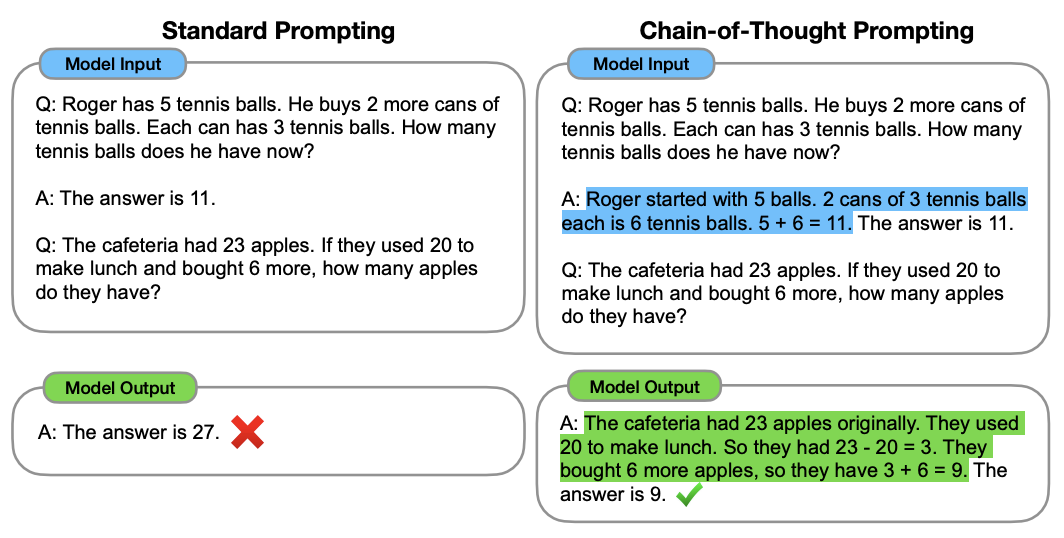
However, there are a few trade-offs for inference systems:
- Reasoning steps increase output token length
- Longer outputs increase latency and inference cost
- Reasoning text may need to be filtered if only the final answer is required
Therefore, some production systems generate reasoning internally and only return the final result to the user.
When does prompt engineering fail?
Prompt engineering is powerful, but it has limits. If a task requires domain knowledge that the model does not possess, or you need strict consistency across millions of requests, prompt engineering alone may not be sufficient. In these cases, techniques such as fine-tuning, RAG, or constrained decoding may be necessary.